Check address and network
Open the USDT withdrawal option if available. Confirm that your receiving wallet supports the selected network. Compare both the address and network before entering the amount.
Review the request
Check the currency, charges, conversion and limits shown for the request. An incorrect address or unsupported network can make recovery difficult or impossible. Keep the withdrawal reference and use the receiving wallet record when checking status.
Rupee amount and USDT amount
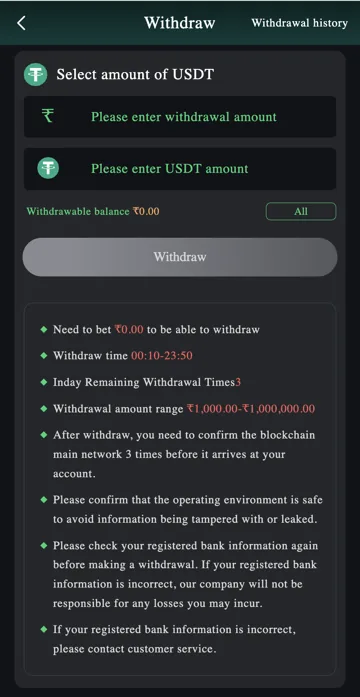
The USDT form has a withdrawal-amount field marked with the rupee symbol and a separate USDT-amount field. Check which amount you are entering and review any conversion presented for the request. Do not assume that one rupee equals one USDT.
Withdrawable balance and All appear below the fields. As with bank withdrawal, All does not bypass conditions or establish a receiving amount. Read the final calculation before submitting.
Network confirmations and history
The USDT notes refer to three blockchain confirmations before arrival. A confirmation count is different from a guaranteed number of minutes. Use the transaction information provided for the request and the receiving wallet’s supported network when checking progress.
The reference form lists a ₹1,000–₹1,000,000 amount range and a withdrawal window. These are not fixed promises for every account. Confirm current values, charges and the exact receiving network in the live account. The image does not identify a specific network, so no network name is prescribed here.
If the receiving wallet has not credited
Check whether the platform has provided a transaction identifier and whether the receiving wallet recognises that transaction on the intended network. Keep the platform request reference separate from any blockchain transaction identifier.
Contact the relevant support route with those references and the exact status. Never share a wallet seed phrase, private key or recovery words. Nobody needs those secrets to trace a public transaction.
Related account help
Need more help?
Read the related articles below for more Veer Game account help. For a website correction, email trendzcollab08@gmail.com with the page address and a short explanation. Do not include passwords, verification codes or bank details.
External account access
These buttons open the external platform. Trendz Collab does not manage your account.

Written by Vacky
Vacky is a Trendz Collab writer with 10 years of content-writing experience. His topics include Veer Game login, registration, the app and game categories. Read our editorial approach.