Veer Game bank withdrawal
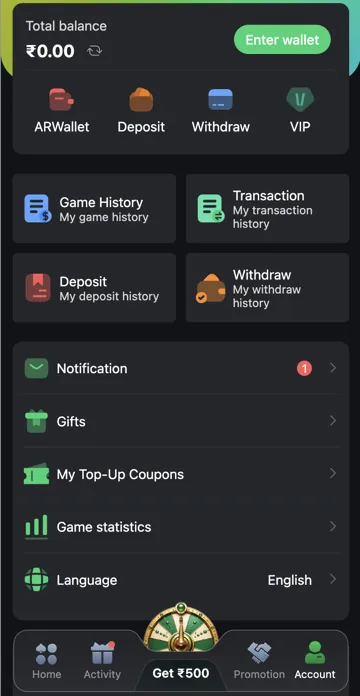
Open Account and select Withdraw. Choose the bank option if available, add or check the receiving account details and enter the amount. Review the conditions and any verification requirements before submitting.
Check withdrawal status
Open Withdraw History to follow the request. Keep its reference and compare the receiving account details with your bank. For a delay, contact platform support with the request information. Do not pay a stranger who promises to release it.
Bank Card, UPI and USDT
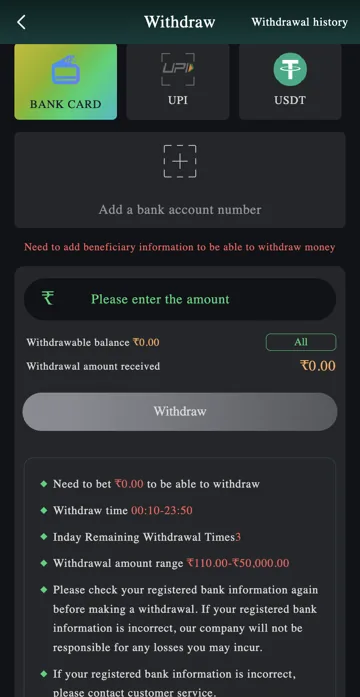
Withdraw has separate Bank Card, UPI and USDT options. Choose the intended method before entering an amount. Bank Card uses beneficiary information; UPI uses its own receiving details; USDT involves a receiving wallet and compatible network.
A bank account and a USDT address are not interchangeable. If the page changes method, review the receiving details again before submitting. Do not assume details saved for one method carry over to another.
Add beneficiary information
The bank option includes Add a bank account number and a message that beneficiary information is needed before withdrawal. Use the account details requested by the form and check them against your receiving account. Do not enter another person’s details merely because they offer to help.
If saved bank information is incorrect, stop and use the platform’s support route before making a request. The withdrawal notes direct users with incorrect registered bank information to customer service. Repeated submissions do not correct the beneficiary.
Withdrawable balance and amount received
Withdrawable balance is the amount the withdrawal form makes available. It is separate from Total balance in Account. The form also has an amount field, All and Withdrawal amount received. Check the final receiving amount rather than assuming it always equals the number you entered.
All is a convenience control for the available amount. It does not remove limits, verification requirements or offer conditions. If the amount received differs from the requested amount, read the explanation or fees before confirming.
Check limits and the daily allowance
Before submitting, read the current amount range, withdrawal window and remaining withdrawal count. These are separate limits: being within the amount range does not mean a request is within the available time or daily allowance.
The bank form provided for this article lists ₹110–₹50,000, a 00:10–23:50 window and three remaining withdrawals. Treat those as a reference for understanding the fields, not permanent limits for every account. The current values beside your own request take precedence; the time-zone basis is not stated here.
Follow the request in Withdrawal history
Use Withdrawal history at the top of Withdraw, or the Withdraw history shortcut in Account. Keep the amount, receiving details, reference and status. Check the bank account separately before treating a request as received.
If the stated processing period passes without resolution, send support the reference and exact issue. Do not provide a banking password, PIN or OTP, and do not pay an unknown person who claims that a further transfer releases the request.
Step-by-step
- Open Account → Withdraw.
- Choose Bank Card if that is the method you intend to use.
- Add or check beneficiary details.
- Enter an amount and compare it with Withdrawable balance and the current amount range.
- Review the amount received, any requirements and the remaining withdrawal allowance.
- Submit only after checking the details, then follow Withdrawal history.
Withdrawal fields explained
| Field | Meaning |
|---|---|
| Add a bank account number | Set up the receiving beneficiary. |
| Withdrawable balance | Amount available through this withdrawal form. |
| All | Fill the available amount; conditions still apply. |
| Withdrawal amount received | Receiving amount to review before submission. |
| Withdrawal history | Records and status for earlier requests. |
Common questions
Is Total balance the same as Withdrawable balance?
Not necessarily. Check the amount made available in Withdraw and any bonus or activity conditions.
Can I use the same details for Bank Card and USDT?
No. They are different receiving methods with different details.
Why can the Withdraw button be unavailable?
Check beneficiary information, amount, available balance and any requirements displayed beside the form.
Related account help
Need more help?
Read the related articles below for more Veer Game account help. For a website correction, email trendzcollab08@gmail.com with the page address and a short explanation. Do not include passwords, verification codes or bank details.
External account access
These buttons open the external platform. Trendz Collab does not manage your account.

Written by Vacky
Vacky is a Trendz Collab writer with 10 years of content-writing experience. His topics include Veer Game login, registration, the app and game categories. Read our editorial approach.