Veer Game login steps
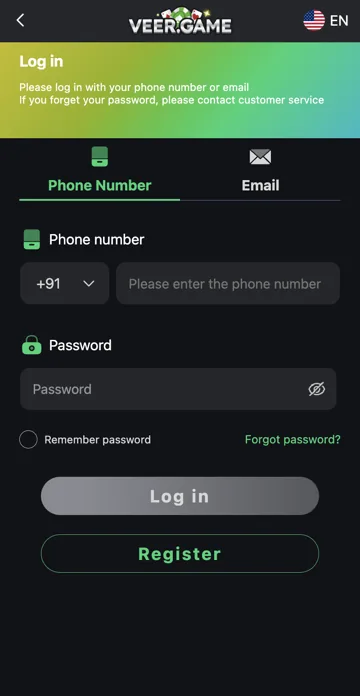
Open Login and select the phone or email option used for your account. For phone login, choose the correct country code and enter your registered number. Enter the account password and check the details before selecting Log in.
Forgot password or failed login
Use Forgot Password if you cannot remember your password. Check for extra spaces, an old saved password or the wrong sign-in option if login fails. Use Remember Password only on a device you control and sign out on shared devices.
Choose phone or email login
Veer Game has separate Phone Number and Email tabs. Select the option linked to your existing account before entering details. A phone account needs its country code as well as its number. Choosing Email changes the identifier you use; it does not create a new account or link an email automatically.
If you registered by phone and have never added an email, start with Phone Number. Use the account details you already know rather than trying a different registration just because one login attempt failed.
Password visibility and saved passwords
The eye icon beside Password lets you check a typing mistake. Use it only when nobody else can read your display. Pay attention to capital letters and any accidental spaces when pasting a password.
Remember password is optional. Leave it off on a borrowed phone, office computer or shared browser. If you have reset the password, a browser may still offer the old saved entry. Replace that entry after you regain access instead of repeatedly submitting it.
When Log in is grey or does not respond
Check that the required fields are filled and that you selected the intended login tab. If a field has an error, correct that field first. If the whole page is unresponsive, check your connection and reopen the same established address in an updated browser.
Clearing saved browser data can remove a remembered login. Before doing that, make sure you know your registered contact details and can use the recovery option. Do not share credentials with someone offering to click through the problem for you.
Login, registration and password reset are different
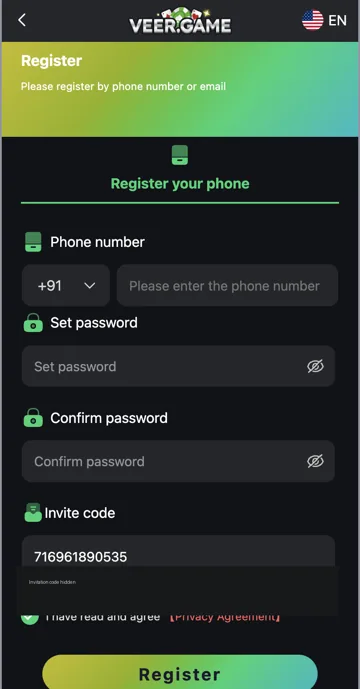
Log in opens an existing account. Register starts account creation. Forgot password opens recovery for an account you already have. If a message says a number is already registered, the next step is usually to check login or recovery rather than create another profile.
For an account restriction, keep the exact error message and the time it appeared. A screenshot with private fields hidden can help support identify the issue. Never include the password, a verification code or a banking PIN in the message.
Step-by-step
- Open the Veer Game login page using Login.
- Select Phone Number or Email to match your account.
- For phone login, check the country code and registered number. For email login, enter the linked address.
- Enter the current password. Check the eye icon privately if you suspect a typing mistake.
- Choose whether to use Remember password on your own device, then select Log in.
Veer Game login options
| Option | What it is for |
|---|---|
| Phone Number | Sign in using the registered number and country code. |
| Sign in with an email linked to the account. | |
| Password eye icon | Check a password entry privately. |
| Remember password | Keep login details on a device you control. |
| Forgot password | Start recovery when the password is forgotten. |
| Register | Open account creation for a new user. |
Common questions
Can I log in without registering?
Login is for an existing account. If you have never created one, registration is a separate process.
Should I register again after a failed login?
Check the login option and use Forgot password first. Another registration does not recover the original account.
Can Trendz Collab reset my password?
No. Password recovery belongs to the separate gaming platform.
Related account help
Need more help?
Read the related articles below for more Veer Game account help. For a website correction, email trendzcollab08@gmail.com with the page address and a short explanation. Do not include passwords, verification codes or bank details.
External account access
These buttons open the external platform. Trendz Collab does not manage your account.

Written by Vacky
Vacky is a Trendz Collab writer with 10 years of content-writing experience. His topics include Veer Game login, registration, the app and game categories. Read our editorial approach.