Veer Game recharge options
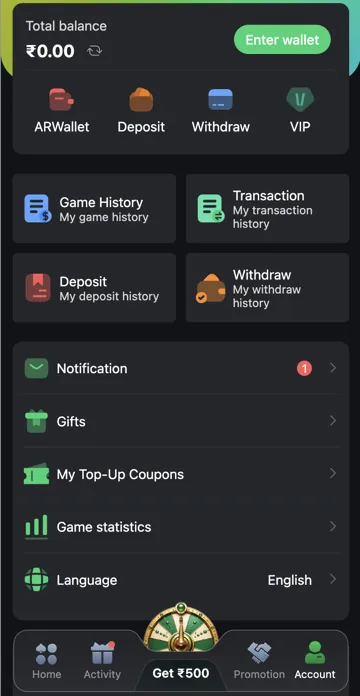
Open Deposit from Account to see available payment options and the amount field. Read the instructions for the option you choose. Availability and limits may differ between accounts or change over time.
Before confirming payment
Check amount, payee details and any stated charges. Use the details for the current transaction rather than an old saved payment image. Keep the payment reference and check Deposit History afterwards.
Payment choices in Deposit
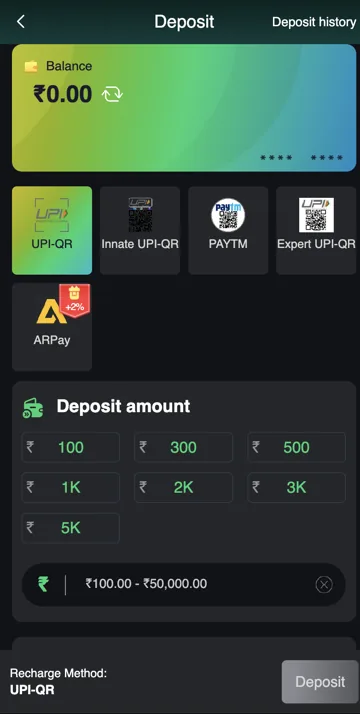
Veer Game Deposit has options labelled UPI-QR, Innate UPI-QR, PAYTM, Expert UPI-QR and ARPay. These are payment-route labels. Choose an option that is currently available to your account and read that route’s instructions before paying.
A logo does not confirm a payment partnership or promise that every user can use that method. Check the payment details generated for your order instead of scanning an old QR image from an article or message.
Preset and custom amounts
Deposit has preset amount buttons and a custom amount field. The presets include ₹100, ₹300, ₹500, ₹1K, ₹2K, ₹3K and ₹5K. K means thousand: ₹1K is ₹1,000, while ₹5K is ₹5,000. These shortcuts fill an amount; they do not pay by themselves.
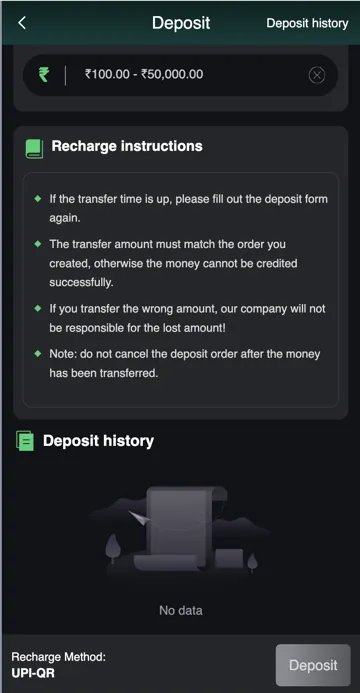
The reference form displays a ₹100–₹50,000 range. Check your current method’s range before creating an order. If you use a custom amount, compare every digit with the order and payment app before confirming.
Match the amount to the order
The recharge instructions require the transfer amount to match the order. For example, an order for ₹300 should not be paid as ₹299 or ₹301. A payment mismatch can need support rather than automatic credit.
If you have already transferred money, keep the order and payment reference. Do not cancel that order or create another transfer to make the numbers look right. Resolve the existing payment through Deposit history and support.
Deposit options and controls
| Control | Purpose |
|---|---|
| Payment method | Select the current route, such as UPI-QR or PAYTM. |
| Preset amount | Fill a common amount without typing it. |
| Custom amount | Enter another amount within the current range. |
| Recharge Method | Confirm the selected route before Deposit. |
| Deposit history | Check an earlier order and its status. |
Related account help
Need more help?
Read the related articles below for more Veer Game account help. For a website correction, email trendzcollab08@gmail.com with the page address and a short explanation. Do not include passwords, verification codes or bank details.
External account access
These buttons open the external platform. Trendz Collab does not manage your account.

Written by Vacky
Vacky is a Trendz Collab writer with 10 years of content-writing experience. His topics include Veer Game login, registration, the app and game categories. Read our editorial approach.