How to recharge Veer Game
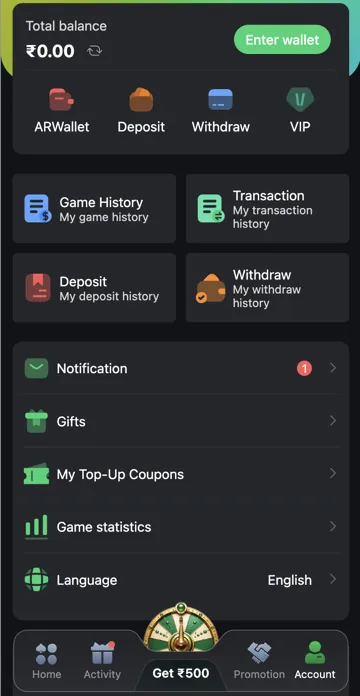
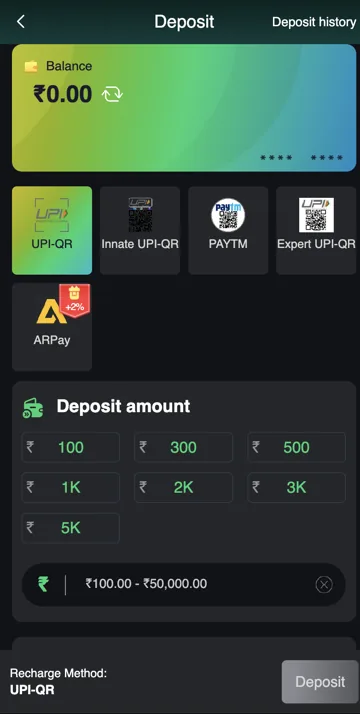
Open Account, select Deposit, enter an amount and choose an available payment method. Review the instructions and receiving details before confirming through your payment app or bank.
After a recharge
Save the payment reference and check Deposit History. If a reference field is required, use the reference for that payment. Do not make a duplicate payment while an earlier one is unresolved or share a payment PIN with support.
Create an order before making the matching payment
Select the payment method and amount in Deposit, then review the order instructions. Use the receiving details provided for that order. A previous QR code or payee can belong to an expired request.
Compare the order amount with the amount in your payment app before approving. The recharge instructions require them to match. Keep the confirmation and payment reference once the transfer is made.
An expired order and a paid order need different handling
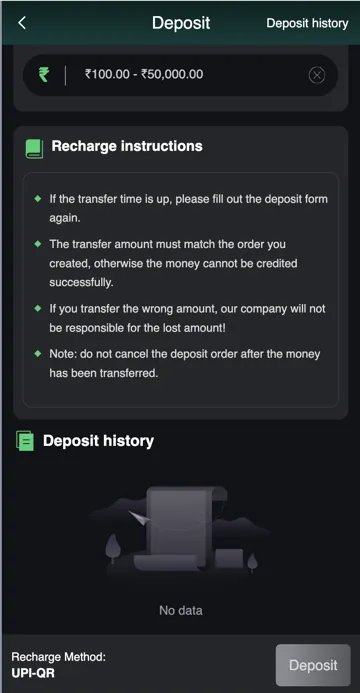
If an unpaid order’s transfer time has ended, the instructions say to fill the deposit form again. First check your bank or payment app to confirm that no payment was made. Starting another order is different from making a second transfer.
If money was already sent, do not cancel the deposit order. The instructions specifically warn against cancellation after payment. Check Deposit history and ask support to trace that existing order with its reference.
Use Deposit history for the follow-up
Deposit history is available at the top of Deposit. Match the order to the payment reference, amount and time. A successful bank transfer and a credited gaming balance are separate records.
If there is a mismatch, explain whether the order expired, the paid amount differed or the bank shows a debit without account credit. A precise description is more useful than repeating a payment. Keep passwords and payment PINs out of the support message.
Step-by-step
- Open Deposit and select a currently available payment method.
- Select a preset or enter an amount within the method’s range.
- Read the generated order and receiving details.
- Compare the payment amount exactly before approving in the payment app.
- Keep the reference after payment; do not cancel an order that has already been paid.
- Check Deposit history and report any mismatch against that reference.
Common questions
Can I pay a different amount from the order?
The recharge instructions require a matching amount. Check before confirming; report an existing mismatch through support.
Should I cancel a paid deposit order?
No. The recharge instructions warn against cancelling after transfer. Keep the order and reference for tracing.
Related account help
Need more help?
Read the related articles below for more Veer Game account help. For a website correction, email trendzcollab08@gmail.com with the page address and a short explanation. Do not include passwords, verification codes or bank details.
External account access
These buttons open the external platform. Trendz Collab does not manage your account.

Written by Vacky
Vacky is a Trendz Collab writer with 10 years of content-writing experience. His topics include Veer Game login, registration, the app and game categories. Read our editorial approach.