Veer Game daily and weekly tasks
Open Activity to review daily rewards and weekly tasks. Read each target and its claim period. Check whether a task is completed and whether a separate claim action is needed.
Watch the conditions
Daily and weekly tasks can have different deadlines. Check whether unused progress carries forward rather than assuming it does. Do not spend beyond your limit simply to complete a reward target.
Daily mission and Weekly tasks
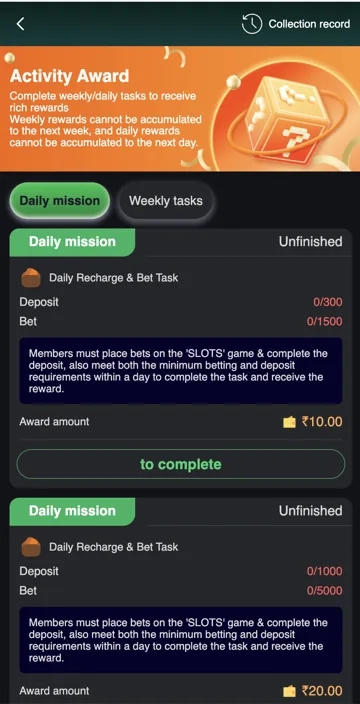
Activity Award separates Daily mission from Weekly tasks. A task lists its deposit target, betting target, completion state and award amount. Completing only one target may leave the mission unfinished.
One daily example pairs a ₹300 deposit target with a ₹1,500 slots-betting target for a ₹10 award. Another pairs ₹1,000 and ₹5,000 for ₹20. These are offer examples, not recommendations to deposit or spend.
Expiry and Collection record
The Activity Award terms state that daily rewards do not carry into the next day and weekly rewards do not carry into the next week. Check the current claim period and completion state before expecting a reward. A progress bar and a collected reward are different records.
Collection record is the place to check earlier reward collections. If a task is unfinished, compare both targets and the eligible game category. Do not assume activity in another category counts towards a slots-specific mission.
Read a reward task
| Item | What to check |
|---|---|
| Daily mission / Weekly tasks | The task period you selected. |
| Deposit | Eligible deposit target and progress. |
| Bet | Required eligible activity and category. |
| Unfinished | The requirements have not all been met. |
| Award amount | Reward tied to that task. |
| Collection record | Earlier collected awards. |
Related account help
Need more help?
Read the related articles below for more Veer Game account help. For a website correction, email trendzcollab08@gmail.com with the page address and a short explanation. Do not include passwords, verification codes or bank details.
External account access
These buttons open the external platform. Trendz Collab does not manage your account.

Written by Vacky
Vacky is a Trendz Collab writer with 10 years of content-writing experience. His topics include Veer Game login, registration, the app and game categories. Read our editorial approach.