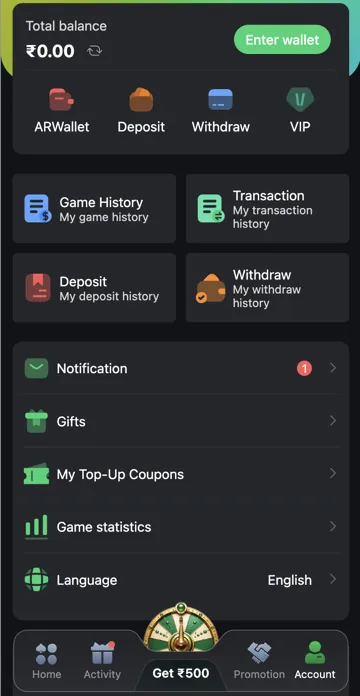
Veer Game Account menu
The Account menu includes Total balance, ARWallet, Deposit, Withdraw and VIP. It also has Game History, Transaction History, Deposit History, Withdraw History, Notification, Gifts, My Top-Up Coupons, Game statistics and Language.
Choose the relevant record
Use game records for game activity and payment history for deposits or withdrawals. Check the amount, reference and status of a specific request. A reward balance can have different conditions from money available for withdrawal.
Four account-history shortcuts
Account has Game History, Transaction, Deposit and Withdraw history shortcuts. Use Game History for a round or game entry, Deposit for a recharge order and Withdraw for a withdrawal request. Transaction is the wider money-movement record. Matching the right record is faster than checking only Total balance.
Gifts, coupons and settings
Gifts opens code redemption. My Top-Up Coupons contains coupon rewards with their own conditions. Game statistics summarises activity, while Language changes available text options. Notification is for account messages. These menu entries have different jobs; a coupon is not redeemed through Game History.
Related account help
Need more help?
Read the related articles below for more Veer Game account help. For a website correction, email trendzcollab08@gmail.com with the page address and a short explanation. Do not include passwords, verification codes or bank details.
External account access
These buttons open the external platform. Trendz Collab does not manage your account.

Written by Vacky
Vacky is a Trendz Collab writer with 10 years of content-writing experience. His topics include Veer Game login, registration, the app and game categories. Read our editorial approach.